SBF Analyzer Satellite Count Explained: SVs Above Horizon, in Track & in PVT
Yes – a GNSS receiver should typically track 25-40 satellites and use 4-30 in its PVT solution, depending on the positioning mode. SBF Analyzer’s Satellite Count charts show three distinct metrics – SVs Above Horizon, SVs in Track, and SVs in PVT – and each answers a different question about receiver health and solution quality.
This guide explains how to read the satellite count time charts in SBF Analyzer (v25.0.0, Septentrio): what the three satellite count metrics mean, what ranges are normal for a four-constellation receiver in open sky, and how to correctly interpret the satellite count change when the PVT mode switches (for example the 27 to 13 drop you may see when entering RTK fixed).
The Three Satellite Count Metrics at a Glance
The Satellite Count chart in SBF Analyzer contains three separate plots – SVs Above Horizon, SVs in Track, and SVs in PVT. Each provides unique information:
| Metric | Meaning | Data source | Normal range (4 constellations, open sky) |
|---|---|---|---|
| SVs Above Horizon | Satellites that should theoretically appear in the antenna’s sky view | Broadcast ephemeris / almanac data, elevation > 0° | 30-50 |
| SVs in Track | Satellites the receiver is actually tracking | Real-time tracking channel count | 25-40 |
| SVs in PVT | Satellites used in the position-velocity-time (PVT) solution | After RAIM+ integrity monitoring screening | 4-30, depends on PVT mode |
How to Generate the Satellite Count Charts
Figure 1 shows the location of the Satellite Count option in SBF Analyzer.
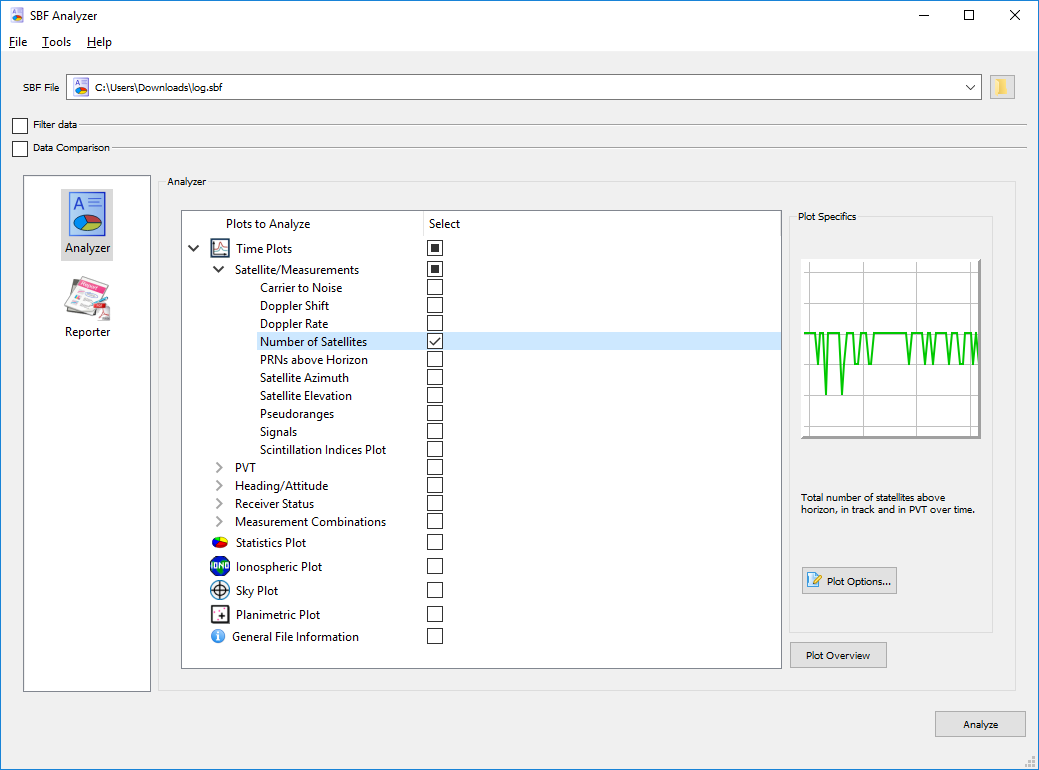
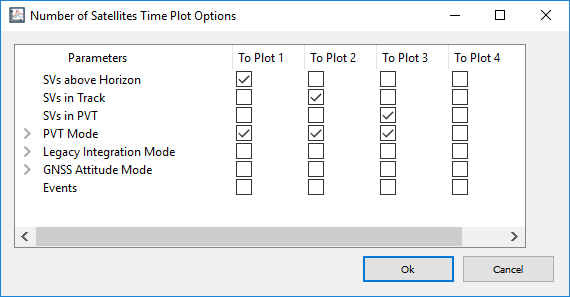
With the Satellite Count option highlighted in blue, choose the “Plot Options…” button to open the window shown in Figure 2. This window lets you select or deselect which specific satellite count charts will be generated.
How Many Satellites Should You Expect?
The number of satellites above the horizon and the number being tracked depend on the constellations, satellites and signals the receiver is configured to use for PVT. More satellites mean higher GNSS measurement availability for positioning.
More satellites in PVT does not always mean a more accurate or more reliable solution. Some GNSS receivers use integrity monitoring to identify and remove erroneous satellite measurements from the PVT solution, which reduces the number of satellites used. For more on Septentrio’s RAIM+ (Receiver Autonomous Integrity Monitoring) technology, see the Septentrio website.
The minimum number of satellites a receiver needs to compute a PVT solution is 4, because there are 4 unknowns to solve (3 spatial dimensions and time). For an RTK PVT solution, each used constellation requires one extra satellite (for example, using GPS+GLONASS requires 5 satellites). When a multi-constellation receiver is used, the number of satellites used in PVT is usually far greater than the minimum.
Interpreting Switches in PVT Mode
You may observe a sharp change in the number of satellites used in PVT, corresponding to a transition in the receiver’s PVT mode. Figure 3 shows such an example.
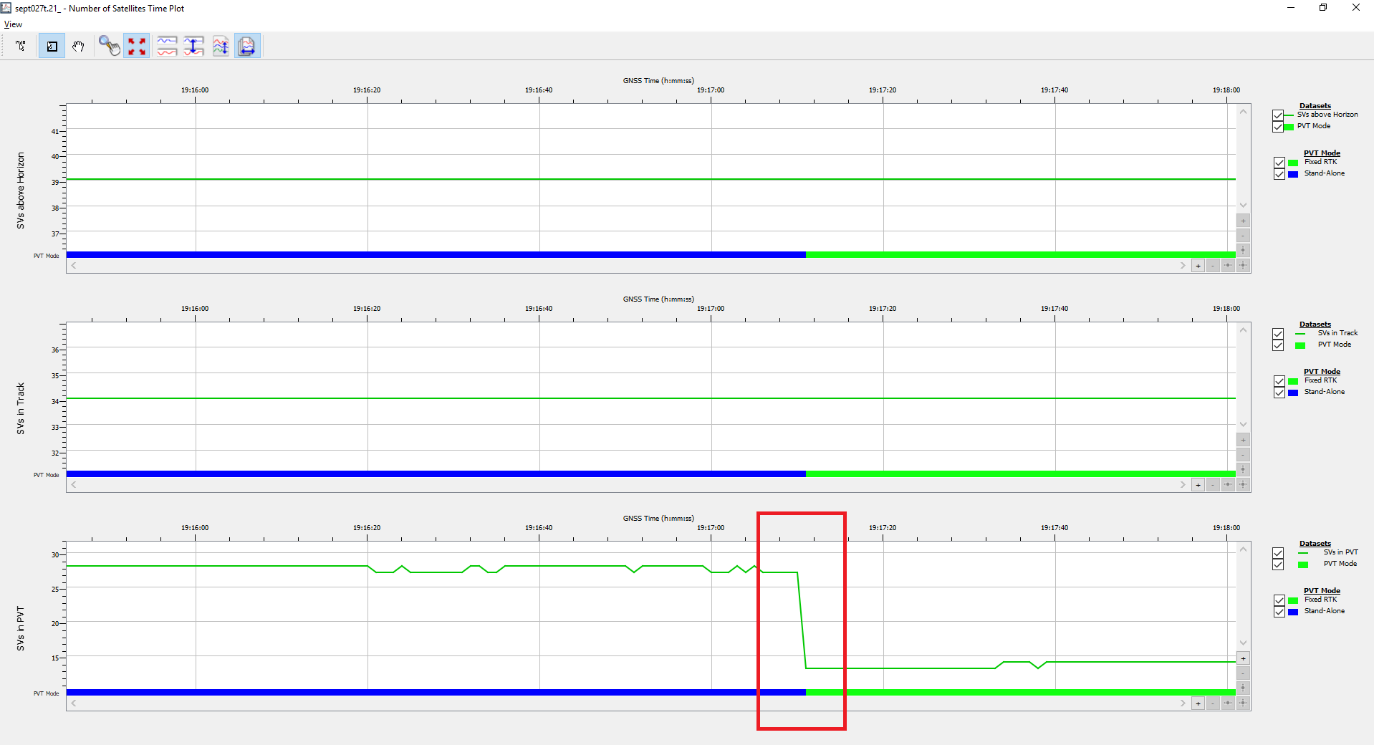
The PVT mode status bar in Figure 3 shows a transition from standalone positioning to RTK fixed positioning around GNSS time 19:17:10 (blue to green). At this moment the number of satellites used in PVT dropped from 27 to 13, while the number of satellites in track remained unchanged.
In this example the receiver was in standalone mode using GPS, GLONASS, Galileo and BeiDou satellites for PVT. An RTCM correction stream was then enabled that contained information only for GPS and GLONASS observations. The receiver used only GPS and GLONASS satellites in the RTK solution, which explains the reduced satellite count.
Why Fewer Satellites Can Be a Good Thing
The 27 to 13 switch described above is normal and favourable. Here is why:
- In standalone mode the receiver includes all tracked satellites (GPS+GLONASS+Galileo+BeiDou) in the PVT solution – more satellites (27), but accuracy of only 2-5 m.
- Once RTK mode starts, the receiver only uses constellations whose differential data is in the base station stream (GPS+GLONASS only in this example) – fewer satellites (13), but after double-difference ambiguity fixing, accuracy improves to 2 cm.
- Conclusion: accuracy improves by a factor of 100, and the satellite count reduction is the RTK algorithm working correctly – not a fault.
Troubleshooting Abnormal Satellite Counts
These are the abnormal signals to watch for:
| Abnormal signal | Possible cause | How to investigate |
|---|---|---|
| SVs in Track clearly below SVs Above Horizon (e.g. 40 vs 15) | Antenna pattern limitation, antenna installation obstruction, or antenna/feedline fault | 1. Check Sky Plot to confirm the azimuth distribution of missing satellites 2. Swap antennas to compare 3. Check the AGC table |
| PVT satellite count persistently below 10 | Incomplete constellation configuration, elevation mask too high, or RAIM frequently excluding satellites | 1. Check the receiver has all four constellations enabled 2. Lower the Mask Angle to 5° 3. Check the RAIM tab for exclusion frequency |
| PVT satellites below 5 in RTK Fixed | Differential source contains very few constellations, or poor base station observation quality | 1. Check whether the base station RTCM configuration includes enough constellations 2. Increase base station antenna openness |
Related SBF Analyzer Features
- Sky Plot – view the azimuth distribution of missing satellites to locate obstruction direction
- DiffCorr Info – see which constellations the base station differential data contains
- RAIM tab – view details of satellites excluded by integrity monitoring
- C/N0 (carrier-to-noise) chart – confirm whether the signal quality of excluded satellites is low
Frequently Asked Questions
How many satellites should a GNSS receiver see above the horizon?
With a four-constellation receiver in open sky, 30-50 satellites are typically above the horizon (based on broadcast ephemeris/almanac data at elevation > 0 deg).
Why does the number of satellites used in PVT drop when RTK fixed is achieved?
In standalone mode the receiver uses every tracked constellation in the PVT solution (e.g. 27 satellites with GPS+GLONASS+Galileo+BeiDou). Once RTCM corrections arrive and RTK fixed is achieved, only the constellations included in the base station’s differential data are used (e.g. GPS+GLONASS only, 13 satellites). Fewer satellites but 100x better accuracy (2-5 m standalone vs 2 cm RTK) – it is normal and favourable.
What is the minimum number of satellites needed for a PVT solution?
4 satellites – there are 4 unknowns (3 spatial dimensions plus time). For an RTK PVT solution each used constellation requires one additional satellite (e.g. GPS+GLONASS needs 5).
What should I check when the tracked satellite count is much lower than above-horizon count?
Check the antenna pattern, installation obstruction, or antenna/feedline fault. Use Sky Plot to see the azimuth distribution of missing satellites, swap antennas to compare, and check the AGC table.
What does SVs in Track vs SVs in PVT mean in SBF Analyzer?
SVs in Track is the number of satellites the receiver is actually tracking in real time. SVs in PVT is the subset that passes RAIM+ integrity monitoring and is used in the position/velocity/time solution.
Sources & References
Author: Jack Wang, Eview GNSS / Nanjing Hongcheng Intelligent Technology Co., Ltd.
Published: August 20, 2026
External references:
- Septentrio – RAIM+ integrity monitoring technology
- Septentrio – SBF Analyzer software
- Related: GNSS Attitude from a Moving Base: Dual-Antenna RTK Guide for Drones and Vehicles
- Related: NTRIP, RTCM, and RINEX: A Complete Guide to GNSS Correction Data Formats
- Related: RTK vs PPK for Drone Mapping
- Related: How to Choose a GNSS Receiver for Surveying