How to Connect Septentrio mosaic-X5 to ROS: ROS 1 & ROS 2 Integration Guide
Connecting a Septentrio mosaic-X5 to ROS is straightforward: install the official septentrio_gnss_driver (ROSaic) package, plug the receiver into your computer over USB or serial, set the device parameter in rover.yaml, and launch the driver. The node then publishes standard ROS messages such as /navsatfix and /gpsfix that any robot or drone stack can consume. This guide covers ROS 1 and ROS 2, plus RTK corrections and AIM+ anti-jamming status.
Why the mosaic-X5 Is a Strong Choice for ROS Development
The mosaic-X5 is a compact multi-band, multi-constellation OEM module with 448 channels covering GPS, GLONASS, Galileo and BeiDou across L1/L2/L5 and E1/E5 bands, plus QZSS and SBAS. It delivers centimeter-level RTK and includes Septentrio’s AIM+ interference mitigation, which keeps the solution stable where standard receivers drop lock. For ROS developers the key point is the interface set: USB (with RNDIS virtual Ethernet), UART, SPI, I2C and CAN. See the module on the mosaic-X5 product page and compare carrier options in the GNSS boards & OEM modules category. Prefer a ready-to-run unit? Eview’s GNSS receiver box uses the same Septentrio core with anti-jamming already integrated.
What You Need Before You Start
- Hardware: a mosaic-X5 module on a USB carrier board, a GNSS antenna, and a computer running Ubuntu 18.04–24.04.
- Software: ROS 1 Melodic or Noetic, or ROS 2 Foxy through Rolling; Humble and Jazzy are the LTS picks.
- Driver: install the binary with
sudo apt-get install ros-$ROS_DISTRO-septentrio-gnss-driver, or build from source viagit clone https://github.com/septentrio-gnss/septentrio_gnss_driverandcatkin build(ROS 1) orcolcon build(ROS 2). C++17 is required.
Step 1 — Connect the Receiver: USB, Serial or TCP
The driver connects via a single device parameter in config/rover.yaml. Three options cover most setups:
- USB (default, recommended): plug the receiver into a USB port. The module exposes an RNDIS virtual Ethernet interface at
192.168.3.1: setdevice: tcp://192.168.3.1:28784and use the web UI athttp://192.168.3.1for status checks. Firmware 4.10.0+ is required for IP over USB. - Serial: set
device: serial:/dev/serial/by-id/usb-Septentrio_.... Use the by-id symlink so the port survives replugging, add your user to thedialoutgroup (sudo adduser $USER dialout) and keep the default baud rate of 921600. - TCP/IP: for networked receivers, point
deviceattcp://<receiver-ip>:28784, the default command port.
Step 2 — Configure and Launch the Driver
In rover.yaml, set frame_id: gnss and enable the messages you need under publish: — navsatfix: true and gpsfix: true are the essentials; aimplusstatus: true exposes anti-jamming status. With configure_rx: true (the default) the driver configures the receiver automatically on startup, so no manual SBF block setup is needed. Then launch:
- ROS 1:
roslaunch septentrio_gnss_driver rover.launch param_file_name:=rover - ROS 2:
ros2 launch septentrio_gnss_driver rover.launch.py
Verify with rostopic echo /navsatfix (ROS 1) or ros2 topic echo /navsatfix (ROS 2): you should see valid latitude, longitude and fix status. The same data is available on /gpsfix as a gps_msgs/GPSFix message.
Step 3 — Feed RTK Corrections for Centimeter Accuracy
For RTK, the driver includes a built-in NTRIP client. Under rtk_settings: in rover.yaml, configure ntrip_1 with the caster address, port (typically 2101), username, password and mountpoint, set rtk_standard: RTCMv3 and send_gga: auto. Corrections can also come from an IP server or serial input. When the solution goes fixed, the covariance in /poscovgeodetic drops to centimeter level — the same RTK workflow Eview documents for drone and UAV RTK GNSS deployments.
Step 4 — Use the Data in Your Robot or Drone Stack
Beyond /navsatfix and /gpsfix, the driver publishes NMEA sentences (/gpgga, /gprmc), SBF-derived topics (/pvtgeodetic, /poscovgeodetic, /atteuler for heading), /pose, and /rfstatus plus /aimplusstatus for interference monitoring. Set use_ros_axis_orientation: true to convert NED to ROS’s ENU frames. Because AIM+ keeps lock under jamming, it is a practical choice for anti-jamming and anti-spoofing GNSS applications where a u-blox-class receiver would fail.
FAQ
Which ROS versions does the septentrio_gnss_driver support?
ROS 1 Melodic and Noetic, plus ROS 2 Foxy, Galactic, Humble, Iron, Jazzy, Kilted, Lyrical and Rolling. Binary apt packages are maintained for Noetic, Humble, Iron, Jazzy and Rolling; others build from source.
Can I connect the mosaic-X5 to ROS over USB?
Yes. USB provides an RNDIS virtual Ethernet link: the receiver gets 192.168.3.1 and the driver connects with device: tcp://192.168.3.1:28784. Plain serial over USB also works.
What topics does the driver publish?
Standard messages include /navsatfix (sensor_msgs/NavSatFix), /gpsfix (gps_msgs/GPSFix), NMEA topics and /pose. SBF-derived topics include /pvtgeodetic, /poscovgeodetic, /atteuler and /aimplusstatus.
How do I feed RTCM3 corrections for RTK?
Configure rtk_settings.ntrip_1 in rover.yaml with caster, port, mountpoint and credentials — the driver runs the NTRIP client itself. Alternatively stream RTCM3 from a base station via an IP server or serial input; multiple correction sources can run simultaneously.
Does the driver expose anti-jamming status?
Yes. With publish.aimplusstatus: true the driver publishes /aimplusstatus and /rfstatus, reporting AIM+ interference mitigation activity and OSNMA authentication status.
Do I need an RTK base station for centimeter accuracy?
RTK needs corrections from a base station or NTRIP service. With fixed RTK the mosaic-X5 reaches centimeter-level accuracy; without corrections it is meter-level, which still suits many navigation and logging tasks.
To skip board-level integration, Eview’s GNSS receiver box ships with the Septentrio core, AIM+ anti-jamming and an RTK-ready setup, so you can focus on ROS software instead of bring-up. Contact Eview for carrier boards, antennas and integration support.
1. Why GNSS Selection Should Start with ROS Compatibility
When an autonomous-vehicle, robot or UAV team evaluates GNSS hardware, three questions usually drive the decision: positioning capability (accuracy and reliability), environmental resilience (interference and spoofing), and ecosystem fit (how fast the receiver can be integrated into the existing software stack). For ROS teams, the third question is where projects live or die. A receiver with excellent RTK performance but no maintained driver means your team owns protocol parsing, coordinate transforms and differential-correction plumbing — forever.
Septentrio scores on all three axes with verifiable public evidence: centimeter-level RTK, AIM+ anti-jamming and anti-spoofing (stress-tested at Jammertest 2025), and an officially maintained ROS driver plus flight-controller ecosystem support. This article focuses on the ecosystem-fit half of the story.
2. Flight Controller, ROS and GNSS: Who Does What
2.1 The flight controller flies; ROS thinks
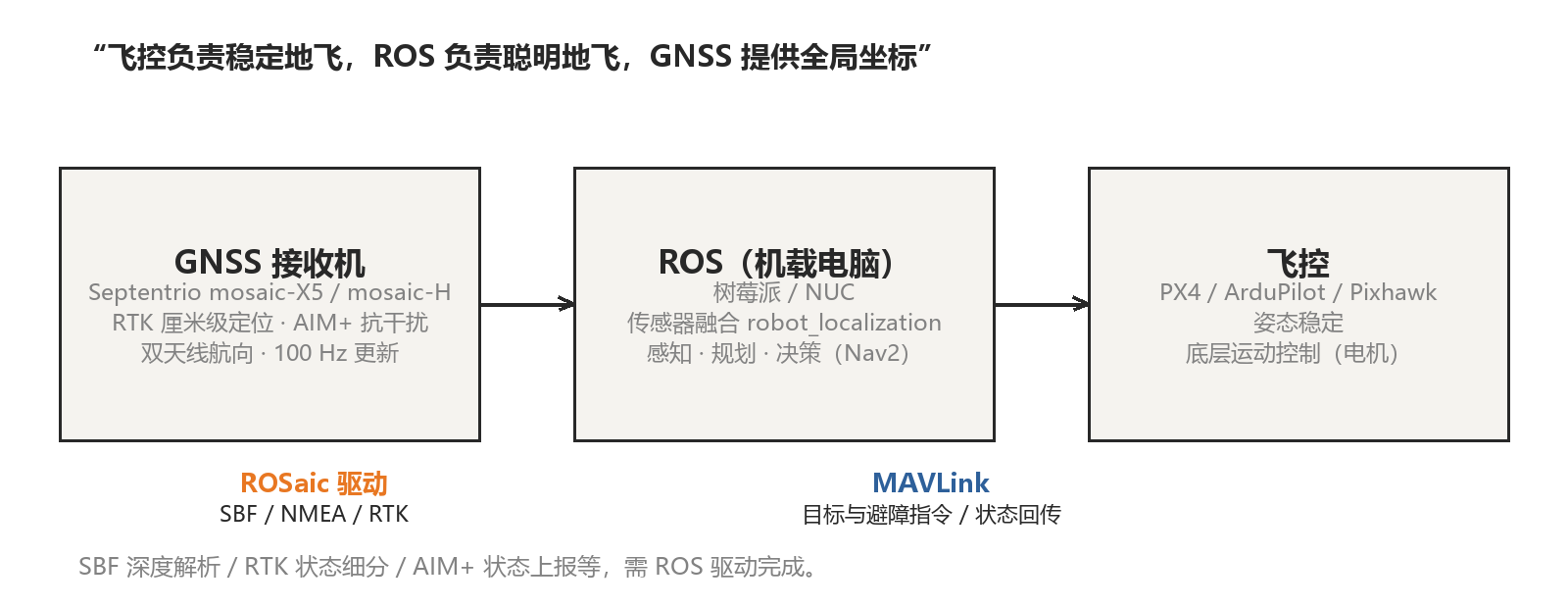
A flight controller (PX4, ArduPilot, Pixhawk) runs on dedicated hardware and is responsible for real-time motor control, attitude stabilization and low-level motion control. ROS (Robot Operating System) runs on an onboard computer — Raspberry Pi, NVIDIA Jetson, NUC — and handles sensor data processing, perception, path planning and mission decisions. The two talk over protocols such as MAVLink: ROS issues goals and avoidance decisions, the flight controller executes them stably.
2.2 Why the flight controller alone is not enough
Flight-controller GNSS drivers typically understand only basic protocols such as NMEA or UBX. The capabilities that matter for serious autonomy — SBF binary blocks, fine-grained RTK status, AIM+ anti-jamming state, multiple concurrent differential sources — stay locked inside the receiver unless software on the companion computer decodes them. And flight-controller compute is too constrained for complex perception and multi-sensor fusion anyway. That is the gap the onboard ROS computer fills, and the reason receiver-native protocols matter.
In one sentence: the flight controller keeps the platform stable; ROS makes it intelligent; and Septentrio receivers plug into both layers.