HB56 + ROS 2 Jazzy: RTK GPS Waypoint Navigation with Nav2
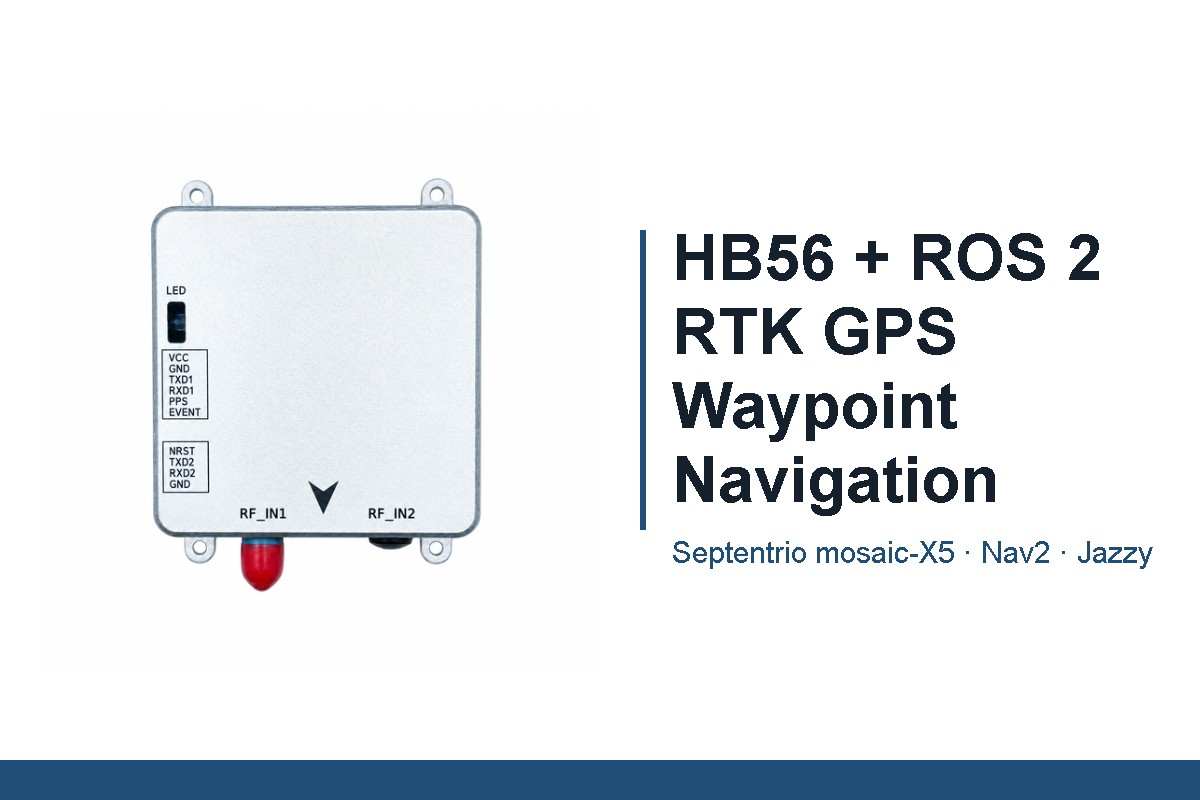
Short answer: to drive a ROS 2 robot to GPS waypoints with centimetre accuracy, connect the Eview HB56 (Septentrio mosaic-X5) over USB or UART, run the official septentrio_gnss_driver, feed RTK corrections, and fuse the GNSS fix with wheel odometry and an IMU in robot_localization (two EKFs plus navsat_transform_node). Nav2 then follows latitude/longitude waypoints. This guide walks through each step on ROS 2 Jazzy.
Need help choosing a receiver for your robot? Email sales@gnss-solutions.com with your platform and interfaces.
What you need
- Receiver: Eview HB56 (mosaic-X5) – 100 Hz RTK, <10 ms latency, AIM+ anti-jamming, on-board SD logging.
- Antenna: a multi-band GNSS antenna such as the EV288, mounted high with a clear sky view.
- Corrections: an NTRIP account or your own base station (see our RTK base station setup guide).
- Software: Ubuntu 24.04 with ROS 2 Jazzy,
septentrio_gnss_driver,robot_localizationand Nav2. - Heading source: an IMU (or wheel odometry while moving). The HB56 is a single-antenna receiver; if your robot must know its heading while standing still, use the dual-antenna HB56H (mosaic-H) instead.
Step 1 – Connect the HB56 and install the driver
Connect the HB56 by Micro USB or one of its two UARTs. Septentrio’s driver supports ROS 2 Humble, Iron, Jazzy and Rolling, with binary packages:
sudo apt install ros-jazzy-septentrio-gnss-driver
sudo usermod -aG dialout $USER   # serial access, then log out and in
Use the stable device path under /dev/serial/by-id/ rather than /dev/ttyACM0, so the port does not change after a reboot. For a full walkthrough of connection options, see How to connect the Septentrio mosaic-X5 to ROS.
Step 2 – Configure the driver for navigation
Copy the driver’s example rover.yaml and set the device, frames and topics. The settings that matter for navigation:
device: serial:/dev/serial/by-id/usb-Septentrio_...   # your HB56
serial:
  baudrate: 921600
frame_id: gnss            # TF frame of the antenna
publish:
  navsatfix: true         # sensor_msgs/NavSatFix for navsat_transform
  gpsfix: true            # extra quality info
use_ros_axis_orientation: true   # ENU, as REP 103 expects
ros2 launch septentrio_gnss_driver rover.launch.py file_name:=rover.yamlNote that the driver writes these settings to the receiver at start-up (unless configure_rx is false), so keep your receiver configuration in this file. Add a static transform from base_link to gnss with the antenna’s real offset on the robot – an antenna 40 cm behind the axle shows up as a 40 cm error in turns.
Step 3 – Add RTK corrections
Without corrections the HB56 gives metre-level positions; with RTK it reaches 0.6 cm + 0.5 ppm horizontal. The driver has a built-in NTRIP client:
rtk_settings:
  ntrip_1:
    id: "NTR"
    caster: "your.caster.address"
    caster_port: 2101
    username: "user"
    password: "password"
    mountpoint: "MOUNTPOINT"
    version: "v2"
    rtk_standard: "auto"
    send_gga: "auto"
    keep_open: true
Check the fix type in the /gpsfix topic (RTK fixed vs float) before you trust waypoint accuracy. If you run your own base, an HB62 or a second HB56 can send RTCM over radio or a serial link instead.
Step 4 – Fuse GNSS with odometry in robot_localization
The Nav2 GPS tutorial uses three robot_localization nodes:
- EKF “odom” – wheel odometry + IMU →
odom → base_link(smooth, local). - EKF “map” – the same inputs plus the GNSS-derived odometry →
map → odom(global, no drift). - navsat_transform_node – converts the HB56’s
NavSatFixinto odometry in the map frame, using the robot’s heading.
Key navsat_transform settings:
navsat_transform:
  ros__parameters:
    frequency: 30.0
    delay: 3.0
    magnetic_declination_radians: 0.0
    yaw_offset: 0.0
    zero_altitude: true
    broadcast_cartesian_transform: true
    publish_filtered_gps: true
    use_odometry_yaw: true
    wait_for_datum: false
The heading convention is the most common mistake. navsat_transform expects yaw in ENU: zero when the robot faces east, +90° when it faces north. If your IMU reports zero at magnetic north, set yaw_offset and the magnetic declination accordingly, or the whole GNSS track will appear rotated around the start point.
Step 5 – Follow GPS waypoints with Nav2
With localization running, Nav2’s GPS waypoint follower takes latitude/longitude goals (the /follow_gps_waypoints action) and converts them to map coordinates for the planner. The Nav2 tutorial includes an interactive follower (click points on a map) and a logged follower (drive the route once, then repeat it) – useful for farm rows, inspection routes and campus delivery.
Troubleshooting checklist
| Symptom | Likely cause | Fix |
|---|---|---|
| Track rotated or mirrored | IMU yaw not ENU | Set yaw_offset / declination; check IMU orientation |
| Position jumps of 1–2 m | RTK float or lost corrections | Check NTRIP connection and fix type; check antenna sky view |
| Robot “slides” in turns | Missing base_link → gnss transform | Publish the real antenna offset |
| No data after reboot | Serial device name changed | Use /dev/serial/by-id/ |
| Fix lost near motors or radios | Interference | Move the antenna and cables away; AIM+ handles most interference |
| Fix lost under trees | Canopy blocks satellites | See our RTK under tree canopy field test; keep odometry/IMU fusion running |
Why the HB56 for ROS 2 robots
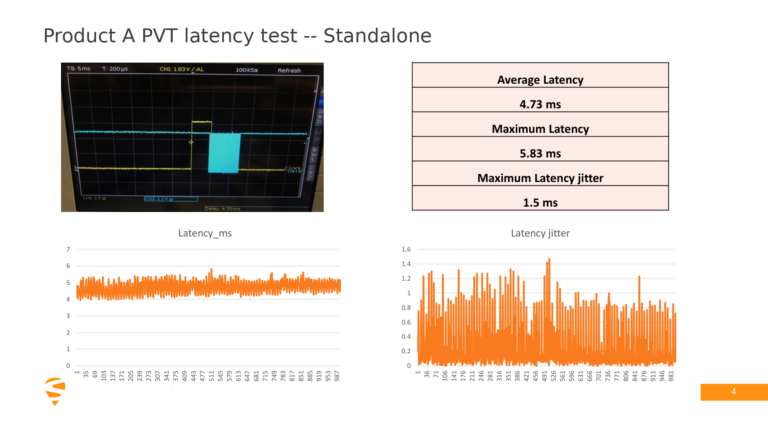
- 100 Hz with <10 ms latency – fits fast control loops (latency and jitter test data).
- On-board SD logging – record raw data during field tests for later analysis or PPK, without a separate logger.
- AIM+ anti-jamming – robots carry motors, radios and power electronics that disturb GNSS.
- Flange-mount metal housing – screws straight onto a chassis.
- Official Septentrio driver – no custom code needed.
For heading without moving, choose the HB56H (mosaic-H); for the smallest build, the HB6 (mosaic-X5). See our robotics GNSS overview.
FAQ
Does the HB56 work with ROS 2 Humble as well as Jazzy?
Yes. Septentrio’s septentrio_gnss_driver supports Humble, Iron, Jazzy and Rolling. The steps in this guide are the same; only the package names change (for example ros-humble-septentrio-gnss-driver).
Do I need a base station?
No, if an NTRIP network covers your area. In remote sites, set up your own base with an HB62 or a second receiver.
Can a single-antenna HB56 give heading?
Only while the robot moves (from the direction of travel) or through an IMU. For heading at standstill, use the dual-antenna HB56H.
Which topic should navsat_transform use?
The NavSatFix topic published by the driver (enable publish.navsatfix).
Can I log raw GNSS data while ROS is running?
Yes. The HB56 logs raw data to its SD card independently of ROS, so you keep a full record for post-processing.
Integrating an RTK receiver into your robot? Send your platform, ROS distribution and interfaces to sales@gnss-solutions.com. Our engineers will recommend a receiver and help with configuration.
Sources: septentrio_gnss_driver (Septentrio, GitHub); Nav2 – Navigating Using GPS Localization; robot_localization documentation.